


Financial Supply Chain Management
Sustainable Trade Finance
Sustainability Report

-
you are in Wholesale Banking

For Individuals
Personal BankingWealth BankingPrivilege BankingFor Companies
Wholesale BankingINDUSTRY INSIGHTSAbout UOB
ABOUT USUOB FinLaB
UOB FinLab

Search FAQs

About Infinity
Cross-border payments and reporting plus (CBPR+) is a set of cross-border financial messaging specifications based on the ISO 20022 (MX) standard.
UOB Infinity, FTS, RFTS, and FileAct channels will be affected by this change. SWIFT FIN is also affected. To learn more, please click here.
UOB Infinity is UOB's digital banking platform for businesses. It offers a comprehensive suite of cash management, financial supply chain management and trade services to help you manage your financial transactions and trade transactions more efficiently.
Yes, UOB Infinity is available 24/7. However, some transactions may be subject to processing hours. For transaction processing hours click here.
Yes, as long as you have internet access while abroad, you will be able to access UOB Infinity anytime, anywhere.
You can access UOB Infinity using a browser on your mobile phone or tablet.
No new login credentials are required. You can use the same login credentials for BIBPlus to access UOB Infinity.
No, the UOB Business app will still be available for Business Banking customers. For the Business app users, “Digital Banking" will replace "BIBPlus Mobile" in the bottom menu and will:
- Open the UOB Infinity App, if the app is already installed on their mobile device; or
- Direct users to download the Infinity app, if the app has not been installed on their mobile device.
Application & Maintenance
Companies, Institutions, Foundations, and business owners that hold a current account or business savings account with UOB are eligible to apply for UOB Infinity.
For more information on UOB business accounts, please visit our website or your nearest UOB branch for your convenience.
You only need to apply for UOB Infinity if you are not a BIBPlus user. You can select "Apply Now" and follow the instructions to download the appropriate form.
- To reset Group (Organisation) ID / User ID - please contact our Corporate Call Centre at 14008 (lokal) atau +6221-2355-9000 (dari luar negeri).
- To reset Password, select Having trouble logging in?” at the bottom of the inbox and follow the on screen instructions.
Please contact your relationship manager or call the UOB Call Center at 14008 (locally) or +6221-2355-9000 (for international customers).
The Bank will require up to 5 business days from the receipt of your application and all required documents to process your application. Once your user ID has been successfully created, the Bank will send an email and SMS to the email address and contact number provided on your UOB Infinity application. Please ensure that the email address and contact number provided in the application form are correct. If you do not receive the UOB Infinity Welcome Pack, please contact the UOB Call Center at 14008 (locally) or +6221-2355-9000 (from overseas).
You will receive a UOB Infinity Welcome Pack sent to your correspondence address. The UOB Infinity Welcome Pack will consist of your UOB Infinity Organization ID and User ID. Depending on the products and services you selected in the submitted form, you may also receive a physical token separately. Note: A physical token is required for Trade Services, Token Sharing, or Global View functionality.
Yes, we can send SMS notifications to Indonesian and international mobile numbers. SMS receipt will also be subject to the rules of the recipient country and network provider.
Fees and charges associated with products and services will continue to apply. For a complete list of fees, please see our fee guide.
Optional services such as Bulk Services and MT103 copy are chargeable.
Fees and charges related to product and services such as BI-FAST and Telegraphic Transfers will continue to apply. For a full list of fees and charges, please see our pricing guide.
For complete transaction processing time limits, please see our cut-off time guide.
Login
You can activate your user ID from the UOB Infinity login page by selecting “Want to activate your new account?” and following the on-screen steps. For all users except Administrators and Corporate Authorizers, your Corporate Administrator can also activate your account on your behalf.
For a step-by-step guide, please click here.
Organization ID – You cannot change your Organization ID. User ID – You can only change your User ID the first time you log in to UOB Infinity. Subsequent changes are not allowed. Password – You can change your password at any time from the “Manage Profile” menu in the top right corner of your dashboard.
UOB Infinity has a “Remember Me” function to save the Organization and User ID from your last login. You only need to enter your password the next time you log in. However, the “Remember Me” function can only save one Organization and User ID.
The biometric feature allows you to access the mobile app quickly and securely by using your mobile devices fingerprint/face recognition function. With this feature, you do not need to enter your password to log in to the UOB Infinity mobile app.
For a step-by-step guide to setup the fingerprint / face recognition authentication, please log in to UOB Infinity, click the user icon  at the top menu bar and click “Need Help?”.
For security reasons, each user is allowed to enable the fingerprint / face recognition function on one mobile device only. If you are switching to a new mobile device, you need to re-enable your fingerprint / face recognition function on the new device. The fingerprint / face recognition function set up on the existing device will be removed automatically once it has been set up on the new mobile device.
For security reasons, your fingerprint / face recognition setup in the app will be removed when you uninstall the app or clear the app data. You will need to re-enable your fingerprint / face recognition function on your mobile device.
For security reasons, your fingerprint / face recognition function will be disabled after the 5th failed attempt.
Please use your password to log in so as to re-enable your fingerprint / face recognition function.
Accounts
UOB Infinity can display account activity data for the last 12 months. For new UOB Infinity customers, you can only view/retrieve account activity data for the last 2 months when you first access UOB Infinity.
Please visit your nearest UOB branch to request the data. Fees may apply.
You will be able to download/export account statements for all your UOB accounts linked to UOB Infinity.
Please note that the layout of downloaded statements differs from physical account statements.
To download/export account statements:
- From the top menu, go to Account > Account Activity from the top menu.
- Select the required account number and date range.
- Click the Export button in the top right corner of the screen.
There are 4 file types available:
- CSV
- Spreadsheet
- Fixed Length
Yes, you can approve all types of transactions using the UOB Infinity mobile app.
Token
Infinity Secure is a digital security token that allows you to log in to UOB Infinity and approve cash transactions in UOB Infinity.
Note: please click here for services that still require the physical token.
If you are an existing BIBPlus user, you will need valid login details (BIBPlus Group ID, User ID, Password and a working physical token) to kick start the registration process for Infinity Secure.
- Download UOB Infinity mobile app and log in to Infinity via the mobile app.
- Register for Infinity Secure (under More Services in the Infinity mobile app).
- Wait for 2 minutes.
- Aktifkan Infinity Secure (di bawah More Services pada aplikasi mobile Infinity).
For a step by step guide, please log in to UOB Infinity, click the user icon at the top menu bar and click “Need Help?”.
If you do not see the option to register Infinity Secure, it is likely that you are using either a private token* or a global token* that is currently not supported by Infinity Secure.
*Note:
- Private token – a shared physical token used by more than one UOB Infinity/BIBPlus login credential within the same country.
- Global token – a single physical token used to access UOB Infinity/BIBPlus accounts in more than one country (e.g. Singapore and Malaysia) with the same login credentials.
This is a security feature of Infinity Secures registration and activation process to prevent fraudulent activation of Infinity Secure
Should you receive the One Time Verification Code via SMS or email for UOB Infinity Secure registration without initiating the registration, please contact UOB Call Center at 14008 (lokal) or +6221-2355-9000 (from overseas) immediately.
Please try again after 30 minutes. If the problem persists, please contact the UOB Call Center at 14008 (lokal) or +6221-2355-9000 (from overseas) immediately.
We advise you to keep the physical token in a safe place as a backup. In the event that you subscribe for any of the above services in the future or should you encounter any unexpected issues when using your Infinity Secure (e.g. loss of mobile phone), you will still be able to authorise transactions using your physical token. For security reasons, keep your active token safe and do not share it with anyone else.
Infinity Secure is currently not available for Token Sharing and Global View services. As such, when you sign up for the Token Sharing / Global View service, your Infinity Secure will automatically be deregistered and a physical token will be issued to you.
- Secure – Infinity Secure is protected by a 6-digit Secure PIN chosen by you. Each UOB Infinity user ID can register for only one Infinity Secure digital token, regardless of the number of mobile devices used.
- Convenient - You do not need to carry the physical token around to log in to UOB Infinity or approve cash transactions. Infinity Secure enables you to receive authentication requests through UOB Infinity’s push notifications.
You may request your Company Administrator (CA) to deregister Infinity Secure that is linked to your user ID. If you are the CA and you have lost your mobile phone, please contact UOB Call Center at 14008 (lokal) or +6221-2355-9000 (from overseas) immediately.
You can either:
- Deregister Infinity Secure from the UOB Infinity app on your existing mobile device before changing to the new mobile device; OR
- Use your physical token and follow the steps in here to start using Infinity Secure on your new mobile device.
No, Infinity Secure will not be automatically deregistered. You will need to deregister Infinity Secure from your account by following these steps:
- Log in to the UOB Infinity mobile app
- Select “More Services"
- Click “Remove Infinity Secure from this account”
If you have forgotten to deregister Infinity Secure before uninstalling the UOB Infinity mobile app, please use your physical token to log in to the UOB Infinity mobile app and follow the above steps to deregister the Infinity Secure. You can also inform your Company Administrator or call the Bank to deregister your Infinity Secure.
Secure.
If you have exceeded the maximum number of tries (i.e. 5 times) for your Infinity Secure PIN, for security reasons, you will be required to re register for Infinity Secure.
Please use your physical token to log in and follow the steps below to register and activate your Infinity Secure.
You will need valid login details (UOB Infinity Organisation ID, User ID, and Password) to kick start the registration process for Infinity Secure.
- Download UOB Infinity mobile app and log in to Infinity via the mobile app
- Register for Infinity Secure
- Wait for 12 hours
- Activate Infinity Secure
For a step by step guide, please log in to UOB Infinity, click the user icon at the top menu bar and click “Need Help?”.
You may refer to the Register your digital security token User Guide to link multiple UOB Infinity User Profiles (login credentials) across different Organisation IDs within the same country to your shared digital token (Infinity Secure) on your UOB Infinity mobile app.
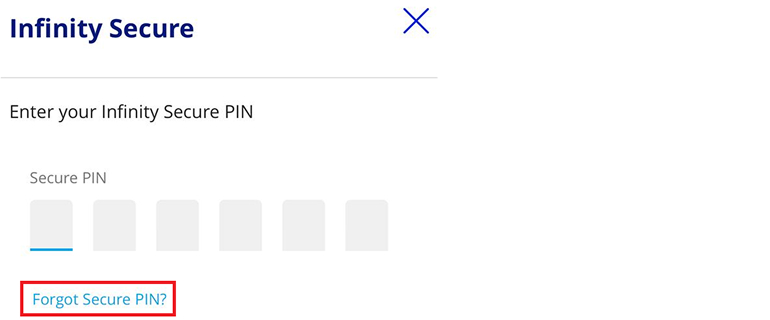
For security reasons, there is no reset function for your Infinity Secure PIN. If you have forgotten your 6 digit Infinity Secure PIN, you can select Forget Secure PIN” on your UOB Infinity mobile screen. After which, you will be guided to re register for Infinity Secure.
If you require a replacement for your physical token, you need to fill up a maintenance form. SPlease contact your relationship manager or visit the nearest UOB branch to your convenience to get the required form.
We strongly encourage you to sign up for Infinity Secure (Digital Token) if you have not already done so. Find out more about Infinity Secure here.
The hard token used for UOB Infinity Cash can also be used to log in to the UOB Infinity Trade Services (FSCM) module.
Security
For the minimum system/browser requirements for UOB Infinity, please refer to the UOB Infinity Product and Service Information Summary (RIPLAY) here.
| Operating System / Browser | Google Chrome Version 65 | Microsoft Edge | Internet Explorer Version: 11 | Mozilla firefox Version: 57 | Safari Version: 11.1.2 |
| Windows 10 | Y | Y | Y | Y | |
| Windows 7 | Y | Y | Y | ||
| Mac OS 10.13 | Y | Y | Y | ||
| iOS 10.3 | Y | ||||
| Android 7.0 | Y |
For transaction security, Bank will periodically review and update the minimum system requirements for browsers and operating systems (OS) for UOB Infinity application.
For the UOB Infinity mobile app, the following OS are recommended:
- iOS - version 11 to version 13. Please note that the UOB Infinity mobile app does not support iPhone 6 and below.
- Android OS - version 7 to version 11.
For transaction security, Bank will periodically review and update the minimum system requirements for browsers and operating systems (OS) for UOB Infinity application.
UOB Infinity has a system that provides a high standard of security for banking over the Internet. This security system safeguards the confidentiality of your personal account information and banking transactions by employing:
- Multiple levels of firewalls
- 2048 bit Secure Sockets Layer (SSL) encryption currently recognised internationally to be of the highest standard in encryption technology commercially available
- A two factor authentication that uses User ID and password (or biometric login for UOB Infinity mobile app) along with a secure token
To further protect your company's account and transaction information while banking via UOB Infinity, we recommend doing the following:
- Change your password regularly as an added security measure
- Clear the browser's cache after each session in UOB Infinity so that details of your transactions are removed
- Always log out properly after you have completed your online banking activities
For more details, you may wish to view our best privacy and security practices.
Getting Help
You can download our user guides by logging in to UOB Infinity, click the user icon at the top menu bar and click “Need Help?”.
Should you require any assistance, please call the UOB Call Center at 14008 (local) or +6221-2355-9000 (from overseas) from Mondays to Fridays, 9.00am to 5.30pm, excluding public holidays.
Yes, we do have regular workshops conducted via webinars. Sign up for a virtual training workshop here.If you cannot find a suitable slot, please contact the UOB Call Center at 14008 (local) or +6221-2355-9000 (from overseas).
Laporan dan Rekonsiliasi
Yes, you can export the transaction details as a PDF or CSV file. The CSV file format is only applicable for bulk transactions. For the PDF file format, you can choose to export the transaction details with or without the audit trail information.
To export transaction details:
- From the top menu bar, select Accounts > Approval Status
- Search for the transaction
- From the action menu (...), select "View Details”
- Select "Export" at the top right of the transaction details
For single transactions:
- If you export as "PDF" , you will be able to download the file immediately.
- If you export as PDF with Audit Trail , you will receive an email notification when the file is ready to be downloaded. To download, from the top menu bar, select Accounts > Download Reports. Select “User Generated" tab > click the download icon for the transaction.
For bulk transactions:
- You will receive an email notification when the file is ready to be downloaded. To download, from the top menu bar, select Accounts > Download Reports. Select “User Generated" tab > click the download icon for the transaction.
Yes, there are a payment advices generated for Telegraphic Transfers. To locate the advice, from top menu bar:
- Select Accounts > Account Activities.
- Select the account number and date range (when the outgoing/incoming Telegraphic Transfer occurred).
- To download, click the icon available at the Advice column.
You can also view and export the inward remittance details using the same steps.
If you are subscribing to other reconciliation/statement reports (e.g. MT940), you can request for the report to be made available in UOB Infinity through your relationship manager or by visiting the nearest UOB branch .
To download the report:
- From the top menu bar, select Accounts > Download Reports
- Click the icon under the "Downloads" column.
We are here to help



Kami menggunakan cookie untuk meningkatkan dan menyesuaikan pengalaman penelusuran Anda. Anda dianggap telah menyetujui kebijakan cookie kami jika Anda melanjutkan untuk menjelajahi situs kami.

