


Financial Supply Chain Management
Sustainable Trade Finance
Sustainability Report

-
you are in Wholesale Banking

For Individuals
Personal BankingWealth BankingPrivilege BankingFor Companies
Wholesale BankingINDUSTRY INSIGHTSAbout UOB
ABOUT USUOB FinLaB
UOB FinLab


Benefits
Faster turnarounds
Optimise your workflow and transaction turnaround time with online submission.
Transparent overview
Track transaction status and history with ease.

Keep track of transactions
Access trade transactions online and transactions effected over the counter.

Have more access online
Download trading advice, track delivery status for export documents, calendar alerts, and bill alerts.
New to UOB Infinity?
For new users without a business account with UOB:
Apply for a UOB business account today to help to manage your business:
Find out more about UOB business accounts
If you are interested in registering for Financial Supply Chain Management (FSCM):
Please contact your relationship manager or our UOB Call Center at 14008 (for Indonesia) or +6221-2355-9000 (for Overseas) from Mondays to Fridays, 9.00am to 5.30pm, excluding public holidays.
Types of Trade Services
-
Trade Services
-
How your business benefits
| Trade Services | How your business benefits |
| Trade Bill Summary | Real-time enquiry of outstanding trade bills |
| Import Letter of Credit (LC) | Application for issuance, amendment and cancellation of LC |
| Import Bill Notifications | Request for trust receipt financing for LC, documents against acceptance, and documents against payment |
| Shipping Guarantee | Application and endorsement Bill of Lading and airwaybills |
| Banker's Guarantee (BG) | Application for issuance, amendment and cancellation of BG |
| Trade Services |
| Trade Bill Summary |
| Import Letter of Credit (LC) |
| Import Bill Notifications |
| Shipping Guarantee |
| Banker's Guarantee (BG) |
Workshops
Workshop for Trade Services
Attend our remote training workshops designed to help you get started on UOB Infinity Trade.
- Registration & Activation UOB Infinity Trade
- Login & Access Trade menu
- Feature Overview functions Infinity Trade
- Online Application Submitting LC / SKBDN, Shipping Guarantee, Bank Guarantee, and Trade Financing
- Approval Workflow Transaction authorization process
- Real-Time Monitoring End-to-end tracking of document and transaction status
- Supporting Features Bill notifications, advices, alert calendars, and maturity reminders
UOB Infinity Trade
Submit trade application / bill instruction on our platform in 3 simple steps:
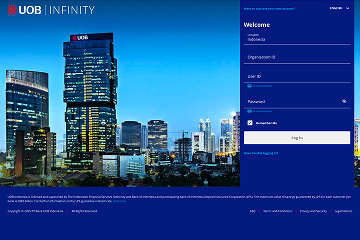
Step 1
Log in via UOB Infinity.
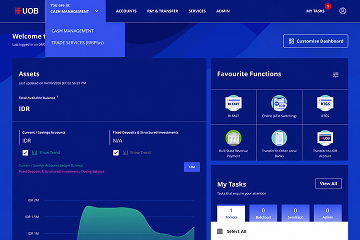
Step 2
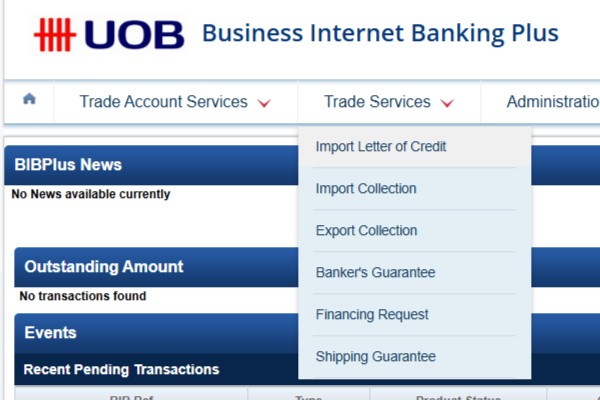
Select Layanan Trade (BIBPlus)/Trade Services (BIBPlus).
Step 3
Select trade product, complete & submit trade application or performing enquiry function.
Ready to apply?
Ready to apply?
For further information regarding this service, you may contact Trade Sales or Relationship Manager Bank UOB Indonesia, or call the UOB Contact Center at 14008.
Frequently asked questions
How do I apply for Trade Services?

Please select "Trade Services" in the registration or maintenance form under "Additional Infinity Services".
How do I access Trade Services from UOB Infinity?
- Log in to UOB Infinity
- From the top menu bar, click on the drop down menu "You are in: Cash Management"
- Select "Trade Services (BIBPlus)"
Why do I see Business Internet Banking Plus (BIBPlus) when I select the “Trade Services (BIBPlus)” option?
The interface upgrade of Trade functions is still a work in progress, and will be introduced at a later stage.
Can I view Trade transactions from Approval Status?
No. You can view trade transactions by selecting “Trade Services (BIBPlus)” > Trade Account Services > Transaction and Reports > Transaction Search.
Can I approve Trade transactions via My Task?
No. You can approve trade transactions by selecting “Trade Services (BIBPlus)” > Trade Account Services > Transaction and Reports > To Do List.
If I am currently at UOB Infinity (Trade Services) screen, how can I set a Trade related alert/notification from Manage Notifications?
No. You can set an alert/notification for a trade transaction by selecting “Trade Services (BIBPlus)” > Administration > Alert Management.
If I am currently at the Trade Services screen in Business Internet Banking Plus (BIBPlus), how do I return to UOB Infinity Cash Management screen?
- From the top menu bar, click on the drop-down menu " Trade Services"
- Pilih "Layanan Cash"
You will be redirected to UOB Infinity Cash Management. There is no need to log in again.
How can I download Trade advices?
There are two ways to download Trade advices:
- From Trade Bill Summary screen
- From the top menu bar, select Account Services > Trade Bill Summary
- Search for the individual outstanding trade bill detail
- Click on the Bank Reference No. hyperlink
- A pop up window with the transaction consolidated summary view and all events including advices related to this trade bill will be displayed
- From Trade transaction screen (e.g. Import Letter of Credit)
- From the top menu bar, select Trade Service > Import Letter of Credit > Processed LC
- Search for the individual LC record
- Click "History of LC”
The LC consolidated summary view and all events including advices related to this letter of credit will be displayed.
How can I apply for Trust Receipt Financing?
Trust Receipt Financing is a type of short term import loan to provide the buyer with financing to settle goods imported where title of goods is held by the Bank
It is applicable for Import bills under Letter of Credit (L/C) and Collection (D/A, D/P).
To access import bills:
- Import Bills under L/C
- From the top menu bar, select Trade Services > Import Letter of Credit > Message to Bank
- Select either From Bill Arrival - Discrepant OR From Bill Arrival Clean
- For Import Bills Under D/A or D/P
- From the top menu bar, select Trade Service > Import Collection > Message to Bank > Action Required
Catatan: If you do not wish to apply for Trust Receipt Financing, you can use the same steps to instruct the Bank to settle the bills by debiting their account.
How can I repay the Trust Receipt Financing?
To repay outstanding Trust Receipt Financing (TF):
- From the top menu bar, select Trade Service > Financing Request > Update TF > From Past TF
- Select the Outstanding TF to repay
- Select one of the following payment options:
- Partial Payment:
- You can indicate the amount to repay with the following repayment options:
- Principal: Indicated amount will be debited for settlement of the principal amount. In addition, the full interest amount will be deducted from the same account.
- Principal + Interest: Indicated amount will be debited for settlement of interest amount. Remaining balance of the indicated amount will then be used to settle the Principal amount.
- You can indicate the amount to repay with the following repayment options:
- Partial Payment:
- Final/Full Payment: This is used to repay the full outstanding amount.
Why is there a difference between the transaction records in Trade Outstanding Amount on the Trade Services landing page and Trade Bill Summary?
The transaction records in the “Trade Outstanding Amount” only reflect transactions effected after your trade access is setup.
The transaction records in “Trade Bill Summary" reflect all transaction records that you have with the Bank. This includes all trade transactions submitted over the counter before your trade access was set up.
Therefore, there may be differences in transaction records if you had outstanding Trade transactions that were effected before your trade access was set up.
Can I access Trade advices for those transactions that I have submitted over the counter?
Yes. Once the transaction is processed by the Bank, the transaction record as well as the relevant Trade advices will be made available in UOB Infinity.
Where can I find more information about UOB Infinity?
Click here for other general frequently asked questions about UOB Infinity.
Additional information
Disclaimer
For further information regarding this service, you may contact Trade Sales or Relationship Manager Bank UOB Indonesia, or call the UOB Contact Center at 14008.
UOB Indonesia is licensed and supervised by The Financial Service Authority and Bank of Indonesia, and is a participant of the Indonesia Deposit Insurance Corporation (LPS). The maximum value of savings guaranteed by LPS for each Customer per Bank is IDR2 billion. For further information on the LPS guarantee interest rate, click here.
You may also like

Cash Management
Manage your cash flow efficiently with real-time visibility of account information and a comprehensive range of payments and collections features.

Financial Supply Chain Management
Manage funding at ease and mitigate risk to ensure stability of your financial supply chain and grow your distribution network.

Regional File Transfer Services
A 24/7 host-to-host solution for secure, automated bulk payment and reporting file exchanges.
We are here to help




Kami menggunakan cookie untuk meningkatkan dan menyesuaikan pengalaman penelusuran Anda. Anda dianggap telah menyetujui kebijakan cookie kami jika Anda melanjutkan untuk menjelajahi situs kami.

